See Nutshell in action!
Try Nutshell free for 14 days or let us show you around before you dive in.

Have you ever wondered if your business would benefit from customer relationship management (CRM) automation?
Fun fact: 82% of businesses use CRMs for sales reporting and process automation. Today’s customers expect frictionless journeys with brands, and one of the most cost-effective and easiest ways to improve your interactions with them is through CRM automation.
If you want to stay ahead of your competitors with CRM automation, keep reading. This blog post will go through 17 CRM automation examples and five best practices you can emulate to streamline your processes, increase your teams’ productivity, and grow your revenue.
Not every possible automation deserves your attention—some deliver massive ROI, while others are nice-to-haves that can wait.
We didn’t just compile a list. Instead, we evaluated hundreds of potential automations against five specific criteria to identify the ones that matter most for growing businesses.
These examples represent proven automation opportunities—the ones that consistently deliver quick wins and strong ROI. They’re not theoretical or aspirational. Teams are implementing these automations right now and seeing measurable results.
Let’s dive in.
Free your team from busy work. Nutshell’s sales automation handles lead assignments, pipeline updates, and follow-up reminders so your reps stay focused on selling.

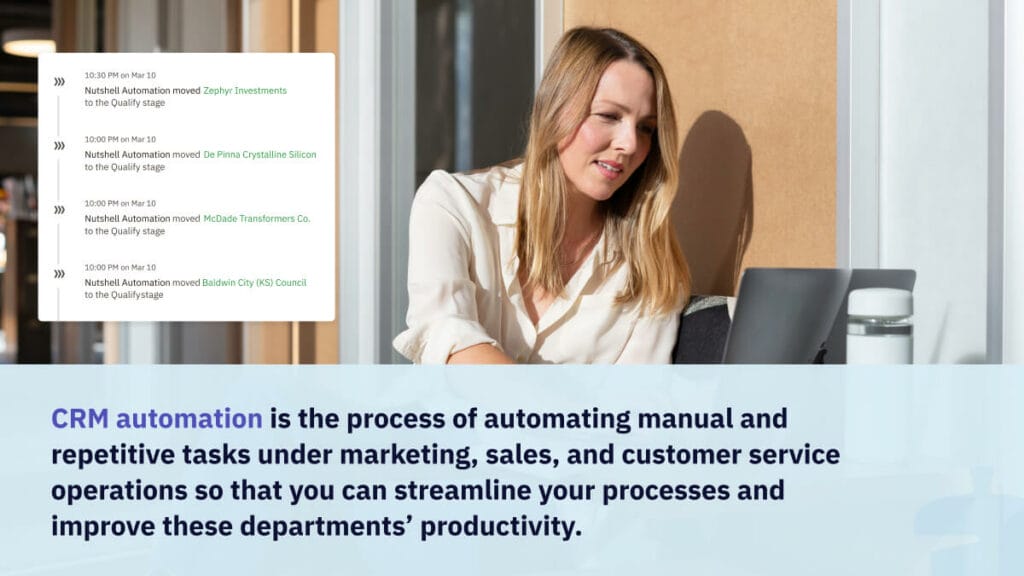
CRM automation is the process of automating manual and repetitive tasks under marketing, sales, and customer service operations so that you can streamline your customer relationship management processes and improve these departments’ productivity.
The main types of activities you can automate with CRM include:
After learning about what CRM automation is, let’s see how it can make a difference for your business by learning some of the major benefits of CRM automation.
Here are some of the ways CRM automation can benefit your business:
CRM automation can improve your sales by streamlining repetitive tasks. This includes tasks like lead nurturing, follow-ups, and data entry. It enables sales teams to prioritize high-quality leads, track customer interactions, and automate personalized communication. This lets your sales team focus on closing deals and improving conversion rates while the CRM system handles important but repetitive tasks.
Whether you’re just exploring automation or ready to implement, here’s a quick overview of what’s possible. These examples span three core business functions—marketing, sales, and customer service.
1. Lead data entry: Best for multi-channel lead collection (web, social, ads)
2. Marketing-to-sales lead handoff: Best for seamless hot lead transfer with auto-scoring
3. Welcome email: Best for new subscriber engagement (86%+ open rates)
4. Personalized marketing campaigns: Best for segmented messaging at scale
5. Lead attribution: Best for tracking which channels drive your best leads
6. Lead prioritization: Best for narrowing focus to most-likely-to-close prospects
7. Outreach to disengaged customers: Best for proactive churn prevention
8. Subscription renewal email send-out: Best for reducing involuntary churn
9. Moving leads to your pipeline: Best for streamlined deal progression
10. Automated sales guidance and reminders: Best for keeping teams aligned on next steps
11. Meeting scheduling and management: Best for reducing scheduling back-and-forth
12. Quote creation and tracking: Best for faster proposal turnaround and engagement tracking
13. Reporting and analytics: Best for data-driven forecasting and performance visibility
14. Acknowledgment receipt send-out: Best for immediate customer reassurance
15. Appointment reminders: Best for reducing no-shows and reschedules
16. Follow-up email to provide further assistance: Best for post-resolution nurturing
17. Surveying your customers and analyzing your NPS: Best for understanding satisfaction trends
Ready to explore these in depth? Keep reading for the full breakdown.
You can automate various tasks with your CRM—from marketing and sales to customer service. Here are 17 CRM automation examples covering these three departments:
Among marketers using automation, 91% say it’s “very important” to their overall success. Here are some CRM marketing automation examples that will inspire you to get started:
Best for: Marketing teams collecting leads from multiple sources (website forms, social media campaigns, email signups, webinars)
Quick summary: Automatically capture lead information from web forms, email submissions, and other channels directly into your CRM—eliminating the need for manual copy-paste or spreadsheet management.
How it works:
Key benefits:
Implementation difficulty: Easy
Time to setup: 30 minutes – 2 hours
Tools & integration: Works with Nutshell forms, Zapier for third-party integrations, or native connectors to your web platform
Best for: Companies with distinct marketing and sales teams where lead quality and timing make or break conversions
Quick summary: Marketing automatically scores leads based on engagement level and transfers only the “hot” prospects to your sales team—eliminating the back-and-forth between departments and getting sales reps working qualified leads immediately.
How it works:
Key benefits:
Implementation difficulty: Medium
Time to setup: 2-4 hours
Tools & integration:Nutshell Pro’slead confidence feature, email engagement tracking, or third-party lead scoring tools
Best for: Any business using email marketing or a mailing list (newsletters, webinars, event signups, free trials)
Quick summary: The moment someone joins your list or signs up for anything, an email automatically goes out welcoming them and setting expectations—capitalizing on peak interest when they’re most engaged.
How it works:
Key benefits:
Implementation difficulty: Easy
Time to setup: 30 minutes – 1 hour
Tools & integration: Any email platform (built into Nutshell email automation, Mailchimp, ConvertKit, etc.)
Best for: Marketing teams targeting different customer segments with different messages (SMBs vs. Enterprise, different industries, different pain points)
Quick summary: Segment your customer list by characteristics, behavior, or interest—then automatically send highly relevant messages to each group instead of one generic message to everyone.
How it works:
Key benefits:
Implementation difficulty: Easy
Time to setup: 1-2 hours
Tools & integration: Nutshell segments & automation, or any email platform with segmentation
Best for: Any business spending on marketing and wanting to understand which channels actually drive results (so you can spend more on what works)
Quick summary: Your CRM automatically tracks which marketing channel brought in each lead—so you know exactly which campaigns, ads, or content pieces drive your best-quality business.
How it works:
Key benefits:
Implementation difficulty: Medium
Time to setup: 2-3 hours
Tools & integration: Nutshell’s lead attribution feature, UTM parameters, or third-party attribution tools like HubSpot
Let your sales team focus on strategies and leave repetitive tasks to your CRM. Here are four sales automation examples a CRM can do for your business:
Best for: Sales teams drowning in leads and unsure where to focus their energy each day
Quick summary: Your CRM automatically scores and ranks leads by their likelihood to convert, so your team always knows which prospects to call first—the ones most likely to buy.
How it works:
Key benefits:
Implementation difficulty: Medium
Time to setup: 1-2 hours
Tools & integration: Nutshell’s lead confidence feature, or add-ons like HubSpot’s lead scoring
Best for: SaaS companies, subscription businesses, or service providers who want to prevent customer churn before it happens
Quick summary: Your CRM automatically identifies customers showing signs of disengagement (declining usage, missed logins, no recent activity), and triggers a re-engagement campaign to win them back before they cancel.
How it works:
Key benefits:
Implementation difficulty: Medium
Time to setup: 4-8 hours
Tools & integration: Nutshell automation, event tracking, and email sequences
Best for: Any subscription or recurring-revenue business (SaaS, memberships, subscriptions, managed services)
Quick summary: A few weeks before a customer’s subscription expires, an automated email goes out asking how they’re enjoying the service and reminding them about the upcoming renewal—no manual tracking needed.
How it works:
Key benefits:
Implementation difficulty: Easy
Time to setup: 1-2 hours
Tools & integration: Nutshell automation, subscription management integration, or email platform
Best for: Sales teams managing multiple pipeline stages and wanting to reduce manual data entry around deal progression
Quick summary: Your CRM automatically moves leads from one pipeline stage to the next based on triggers you define—eliminating manual stage updates and keeping pipeline data current.
How it works:
Key benefits:
Implementation difficulty: Medium
Time to setup: 2-4 hours
Tools & integration: Nutshell workflow automation, document tracking integration (like DocuSign or PandaDoc)
Best for: Sales teams (especially with newer reps) who need consistent guidance on what to do next at each pipeline stage
Quick summary: As deals move through your pipeline, your CRM automatically reminds reps of the next step they should take and any guidance or resources they need to complete it successfully.
How it works:
Key benefits:
Implementation difficulty: Medium
Time to setup: 2-3 hours
Tools & integration: Nutshell automation and task management
Best for: Sales teams and customer success teams spending too much time on meeting logistics instead of conversations
Quick summary: Stop the back-and-forth emails about scheduling. An automated meeting scheduler checks availability and sends calendar invites—freeing up your team to focus on deal conversations, not logistics.
How it works:
Key benefits:
Implementation difficulty: Easy
Time to setup: 30 minutes – 1 hour
Tools & integration:Nutshell’s meeting scheduler, Calendly, or Acuity Scheduling
Best for: Sales teams sending proposals—whether simple quotes or complex multi-page agreements
Quick summary: Instead of manually creating quotes in Word or Google Docs, your CRM generates them automatically from your product/service catalog, and then tracks whether prospects actually open and view them.
How it works:
Key benefits:
Implementation difficulty: Easy
Time to setup: 1-2 hours
Tools & integration:Nutshell Quotes & Invoices feature, or connect to DocuSign/PandaDoc
Best for: Sales leaders who need real-time visibility into pipeline health, team performance, and forecast accuracy
Quick summary: Your CRM automatically generates sales reports and analytics dashboards showing pipeline status, win rates, deal velocity, and rep performance—no manual spreadsheets required.
How it works:
Key benefits:
Implementation difficulty: Medium
Time to setup: 2-3 hours
Tools & integration: Nutshell reporting and analytics built-in
Take our guided tour to explore Nutshell’s incredible features!

Keep your customers satisfied with your service through the help of customer service automation in CRMs. Here are some CRM automation examples for customer service:
Best for: Customer service and support teams handling service requests, tickets, or inquiries
Quick summary: The moment a customer submits a support request or service ticket, an automated email goes out confirming you received it and setting expectations for response time.
How it works:
Key benefits:
Implementation difficulty: Easy
Time to setup: 30 minutes
Tools & integration: Nutshell automation or ticketing system
Best for: Customer service, field service, or support teams managing customer appointments (service calls, consultations, training sessions)
Quick summary: A day or two before a customer appointment, an automated reminder goes out so they don’t forget and leave your team with an empty calendar slot.
How it works:
Key benefits:
Implementation difficulty: Easy
Time to setup: 1-2 hours
Tools & integration: Nutshell automation or scheduling integration
Best for: Customer success teams and support departments wanting to ensure customers are actually satisfied after resolving their issue
Quick summary: After a support ticket or service request is marked complete, an automated email checks in with the customer asking if their issue was truly resolved and offering further help if needed.
How it works:
Key benefits:
Implementation difficulty: Easy
Time to setup: 1-2 hours
Tools & integration: Nutshell automation
Best for: Any business wanting to understand customer satisfaction, identify at-risk customers, and celebrate your promoters
Quick summary: Automatically send your Net Promoter Score (NPS) survey to customers on a regular schedule, and automatically categorize responses so you can identify promoters, passives, and detractors without manual spreadsheet work.
How it works:
Key benefits:
Implementation difficulty: Easy
Time to setup: 1-3 hours
Tools & integration: Nutshell surveys, SurveySparrow, Typeform, or Qualtrics integrated into CRM
The biggest change in CRM automation in recent years is the increasing availability of artificial intelligence (AI). AI technology makes CRM automation faster and more powerful and even enables new automation capabilities.
With AI, CRMs can analyze large amounts of data, such as sales data, lead data, and past interactions with customers, and gather valuable insights from it.
For example, with Nutshell, you can summarize your timelines to get a summary of all your past interactions with a lead or customer, giving you the context you need to have more productive interactions with them. Nutshell can also generate summarizations of your Zoom calls so that your team can quickly catch up on what you accomplished in meetings.
AI can also assist with writing, and some CRMs, including Nutshell, have built-in AI writing tools to help with writing emails and other tasks.
Other uses of AI for CRM automation include audience segmentation, voice-to-text tools, and reporting.
Nutshell Business has what you’re looking for, with features to supercharge your team’s productivity.
CRM automation should make your teams more efficient and productive. To ensure this effort doesn’t require too much work on your team members, here are four CRM automation best practices:
Use consistent formatting for your data. Create a document outlining your data entry and update guidelines, including how conversation logs are typed in. This ensures productivity across the board, so other team members can easily understand all the details saved in each customer profile.
After you’ve created your guidelines, it’s important to get everyone who uses the CRM on board. Minimize mistakes in early automated workflow adoption by providing training and demos on the new automation processes, guidelines, and what their role is in the process.
If your team is already familiar with automated customer relationship management, getting used to a new workflow should take no more than two or three weeks of practice. Provide as much hands-on help as you can, and be open to feedback and questions during this adoption phase.
Do you simply upload your customer data and call it a day? If you do, chances are some recipients have not received your emails.
Ensure you have a maintenance schedule for your CRM’s database to check in with your customers about their updated contact details. If your past emails bounced, make sure to edit or delete them. By regularly cleaning your data, your team members don’t have to deal with outdated customer data or customers who are no longer interested in your product or service.
Boost your productivity by having a CRM that you can access through a mobile device. Nutshell is an easy-to-use CRM that has a mobile app. It also lets you save your prospect’s data by taking a photo!
CRM automation should help boost productivity among various teams within your organization by taking up repetitive tasks. If your automation workflows are too complex, some of your team members might not adopt the automated customer relationship management tool. The result is an investment that doesn’t help your business and doesn’t provide returns.
Keep your workflows simple and effective, so your team can maximize your CRM automation tools. It also helps to have a user-friendly CRM like Nutshell so that adoption won’t be a problem.
CRM automation streamlines your processes and improves the productivity of your marketing, sales, and customer service teams. If you want to help your customer-facing teams with automation in CRM, consider Nutshell.
Nutshell is a flexible and user-friendly CRM with automation that can help you with marketing tasks, sales, and customer service automation. Try it for free for 14 days!
Most businesses see initial ROI within 6-12 months, with some reporting time savings as early as 30 days. According to Forrester, companies using advanced CRM automation achieve 324% ROI over three years. Quick wins include reduced data entry time and faster lead response, while full benefits like improved conversion rates typically emerge after 6 months.
CRM automation focuses on streamlining sales processes and customer data management across all departments. Marketing automation specifically handles campaign execution, lead nurturing, and top-of-funnel activities. While marketing automation feeds qualified leads to sales, CRM automation manages the entire customer lifecycle. Nutshell combines both capabilities in one platform.
Modern CRMs like Nutshell are designed for non-technical users, with most small teams completing basic setup in 1-3 days. The key is starting simple with core features like contact management and automated follow-ups, then gradually adding advanced automation. With Nutshell’s free support and pre-built templates, implementation is straightforward.
Common pitfalls include over-automating and losing the human touch, implementing without proper team training, neglecting data quality, and creating overly complex workflows. Start with mapping your actual sales process, keep automation simple, maintain clean data, and always leave room for personal interaction when it matters most.
Yes, most modern CRMs offer extensive integration capabilities. Nutshell connects with popular tools like Google Workspace, Microsoft 365, QuickBooks, Mailchimp, and hundreds more through our AppConnect marketplace. Native integrations ensure seamless data flow between systems, eliminating duplicate entry and keeping all teams aligned.
Try Nutshell free for 14 days or let us show you around before you dive in.


Join 30,000+ other sales and marketing professionals. Subscribe to our Sell to Win newsletter!